A company wants to read incoming email orders automatically and save them in its ERP. It gets a quote for building the application and a forecast of what the AI model will cost to use. Both numbers look reasonable. Is that enough to approve the budget?
Not yet. The quote may leave out fees for reading attachments, access to company data, ERP integration, infrastructure that runs around the clock, and handling the orders the system can't cope with. Some of those costs only show up with a particular architecture. Others start growing only once order volumes go up.
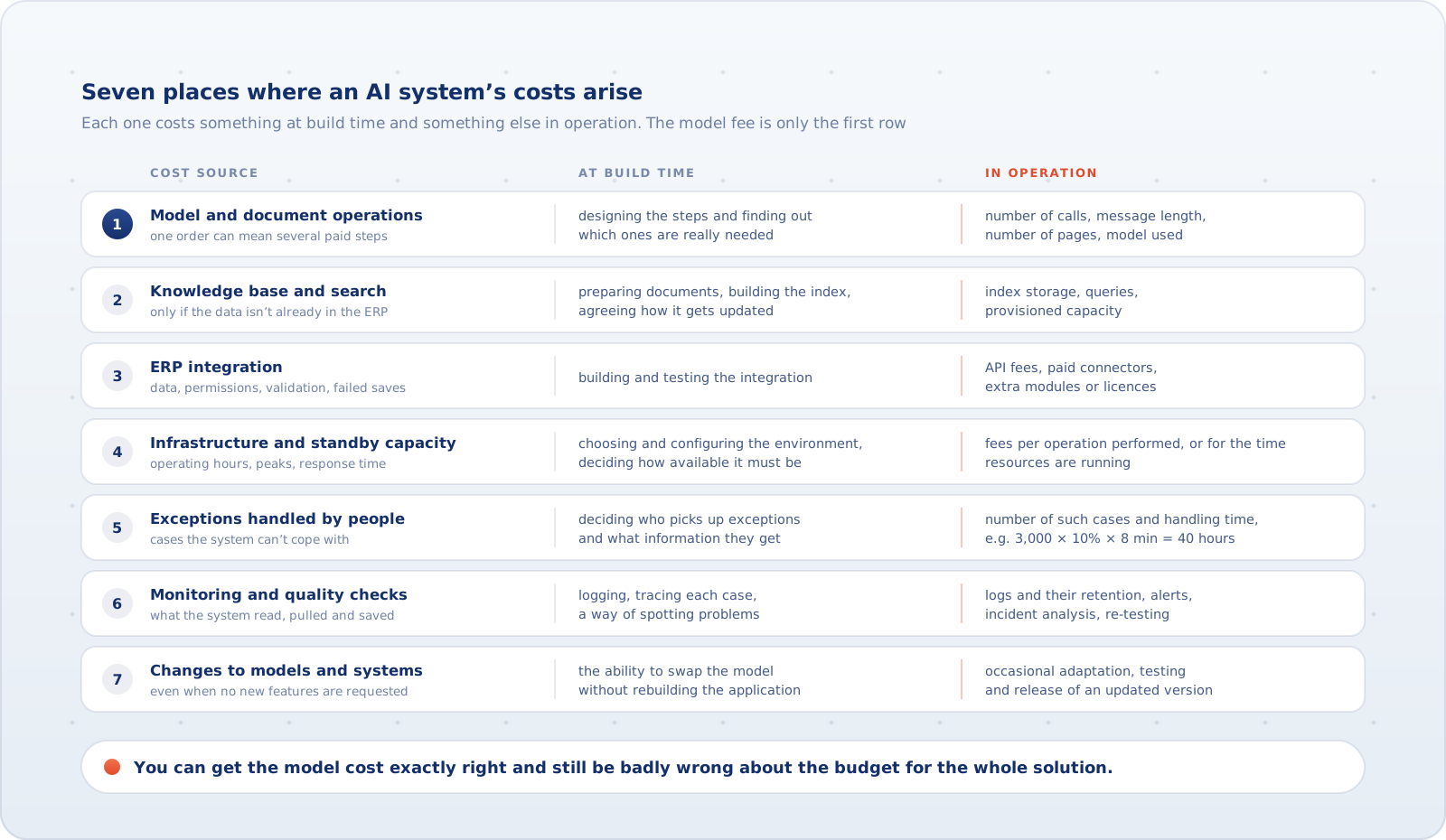
You can get the model cost exactly right and still be badly wrong about the budget for the whole solution. So before you build, you need to know more than the price of one AI operation. You need to know which services and activities it takes to see a single order through to the end.
Building, running and changing are three different costs
The first budget covers preparing the process, the data, the application and the integrations, plus testing and launch. The second is about the system's day-to-day work: processing cases, keeping services running and the time people put in. The third is spending on changes after launch, such as adapting an integration after an ERP update. That work doesn't come up every month, but over a few years you can't assume the system will stay as it is.
You also need to tell a new cash outlay apart from the cost of using resources you already have. If the company's platform lets you run a new automation at no extra charge, don't present the whole subscription you were already paying as a new expense. When you work out the full cost of the system, though, it's fair to assign it a reasonable share of shared resources. The same goes for an existing employee's time: it has economic value, even if their involvement in the new process doesn't necessarily increase payroll costs. It's the same gap between hours and money that the part on the business case dealt with.
Where exactly do the costs of an AI system come from?
One order can mean several paid operations
A simple calculation sometimes assumes that one order equals one call to the model. In practice, a message may contain a scanned PDF, a product table and a note from the customer changing the delivery terms. The system may read the attachment, extract the order lines, check ambiguous data and prepare the result for saving, each as a separate step. If it uses paid document recognition, there's a per-page fee on top. Not every architecture needs a separate OCR service.
At build time you pay for designing those steps and finding out which ones are really needed. In operation the cost can depend on the number of calls, the length of the messages, the number of pages and the model used. If documents get longer, the monthly bill can go up without a single extra order.
So ask for a quote that shows the cost of a simple order, an order with a large attachment, and a case that needs extra analysis. A single average rate for "handling a message" can hide that difference.
A separate knowledge base can cost money even with few queries
If the system only has to recognise an order number, it doesn't need an elaborate knowledge base. If it has to match order lines against the current product catalogue, reading the data straight from the ERP may be enough. A separate search service and index may be needed when the system searches unstructured documents such as procedures, product descriptions or contracts. That index also has to be kept up to date.
At build time you pay for preparing the documents, building the index and agreeing how it gets updated. In operation there may be costs for storing the index, running queries and the resources the search service needs. Some services also charge for provisioned capacity, so you can be paying even when very few searches are made.
Check three things in the estimate: how many documents will be stored, how often they need updating, and whether the search service charges per query, for provisioned resources, or both. The most important decision comes earlier, though: do we need a separate search service at all, given that part of the data is already available in the ERP?
ERP integration is more than building a connector
Order automation has to check that the customer and product exist in the ERP, work out the right identifiers and save the result safely. So the build includes agreeing on data, permissions, validation and what happens when a save fails. An API call on its own rarely solves any of that.
Up front you pay for building and testing the integration. After launch there may be fees for API usage, paid connectors, extra modules or licences. Having access to the ERP doesn't guarantee that your current licence also lets an external application read and write data automatically. Sometimes you have to buy an integration module, move to a higher plan or pay for additional access.
Before choosing how to integrate, check the contract terms and limits: is the API covered by the licence, is the connector paid, are there caps on the number of calls, and how does the fee change once the automation handles more orders? Not every ERP charges extra, but skipping this check can decide whether the chosen solution pays off.
The estimate should also cover later changes to the integration. If the ERP vendor changes the interface, or the company restructures its product master data, the connection may need adapting even though nothing about the AI has changed.
Sometimes you pay for standby capacity even when no orders come in
A system that processes orders once an hour has different requirements from one that must respond instantly, at any time of day and under heavy traffic. The second may need always-on resources, more throughput or failover arrangements.
At build time you pay for choosing and configuring the environment and deciding how available it needs to be. Later, some services bill for the operations actually performed and others for the time resources are running or reserved. Under the second model, the company may be paying for a server or a set amount of throughput during hours when no orders arrive. Sometimes the system spins up for a fixed period, and the fee for that period doesn't depend on how many requests it handled.
This directly changes the cost of a single order. If the same resources can handle both 100 and 1,000 orders a month, the fixed cost per order is ten times lower at the higher volume. At low volume it can be high, even though a single model call costs very little. And once the load exceeds the available capacity, there's another expense for scaling up.
For the quote, specify operating hours, expected peaks and an acceptable response time. Extra requirements for availability, data processing region or backup infrastructure can raise the cost regardless of how many cases there are. There's no reason to pay for specs the process doesn't need. But you can't design a critical service as if it were an occasional experiment either.
Cases handed to people still cost money
The system may read most orders correctly and pass the rest to a person. In that case, quoting model costs or the automation rate alone isn't enough. You also need to estimate the time spent resolving exceptions.
Take a hypothetical 3,000 orders a month. If 10% need manual handling that takes 8 minutes on average, that's 40 hours of work a month. At an assumed cost of 80 PLN per hour, it comes to 3,200 PLN worth of labour. That doesn't have to mean hiring someone or a bigger payroll. It does mean those 40 hours won't go to other work.
At build time the company has to decide who picks up exceptions and what information they should get. In operation the cost depends on the number of such cases and how long they take. If order volume doubles and the share of exceptions doesn't fall, the amount of manual work may roughly double as well. Once the existing team runs out of capacity, a new expense for hiring or outsourcing becomes a real possibility.
Checking how the system performs doesn't end with acceptance tests
When a customer reports a wrong order, the company has to find out what the system read, what data it pulled and what it saved in the ERP. That's why logging, a way to trace each individual case and a way of spotting problems have to be planned during implementation.
In operation, costs can include collecting and storing logs, alerting, incident analysis and re-checking quality after significant changes. With cloud providers, some of the fees depend on the volume of logs processed, and sometimes on how long they're kept. There are often free tiers and features bundled into other services. So you can't assume every log entry adds a charge, but very detailed logging and long retention can push the bill up.
The quote should therefore say what information will really be recorded, for how long, and who is going to analyse problems. A line item that just says "monitoring", with no scope and no owner, explains nothing. What that oversight looks like in practice is covered in the part on monitoring the system and responding to AI errors.
The system needs changes even when you don't ask for new features
The AI model your solution was built on won't necessarily be available for the solution's whole lifetime. Providers publish schedules for retiring older models, which can mean configuration changes, application updates and another round of testing. Even if the company never requests a single new feature, it has to check that the new model still handles its business cases correctly.
At build time it pays to make sure the model can be swapped and integrations updated without rebuilding the whole application. Later there may be occasional costs for adapting, testing and releasing an updated version. Changes in the ERP and new data or access requirements have similar consequences. None of this is an argument for charging an arbitrary monthly percentage "for maintenance". But the estimate should include the scope of regular support and, separately, how larger changes will be billed.
A cheaper build can mean a bigger bill later
Consider two ways of handling the same orders. In the simpler one, every order, including the easy and repetitive ones, is sent to an expensive model along with a large chunk of data. The second takes more work to build: it identifies simple cases up front, uses rules for validation and runs the costlier analysis only when it's needed. That can cut model fees and the work spent on exceptions. But you still have to check that the extra mechanisms don't cost more than they save. Which steps of a process need a model at all was the subject of the part on choosing the technology.
Purely for illustration, say the first option costs 50,000 PLN to build and 10,000 PLN a month to run, and the second costs 100,000 PLN to build and 6,000 PLN a month. We assume the same quality of service, comparable volume and the same cost categories counted in both. Under those conditions the second option becomes cheaper overall after 12.5 months. If its real monthly advantage turns out to be only 2,000 PLN, the extra investment takes 25 months to pay for itself. These are illustrative figures, not market prices or results from real projects.
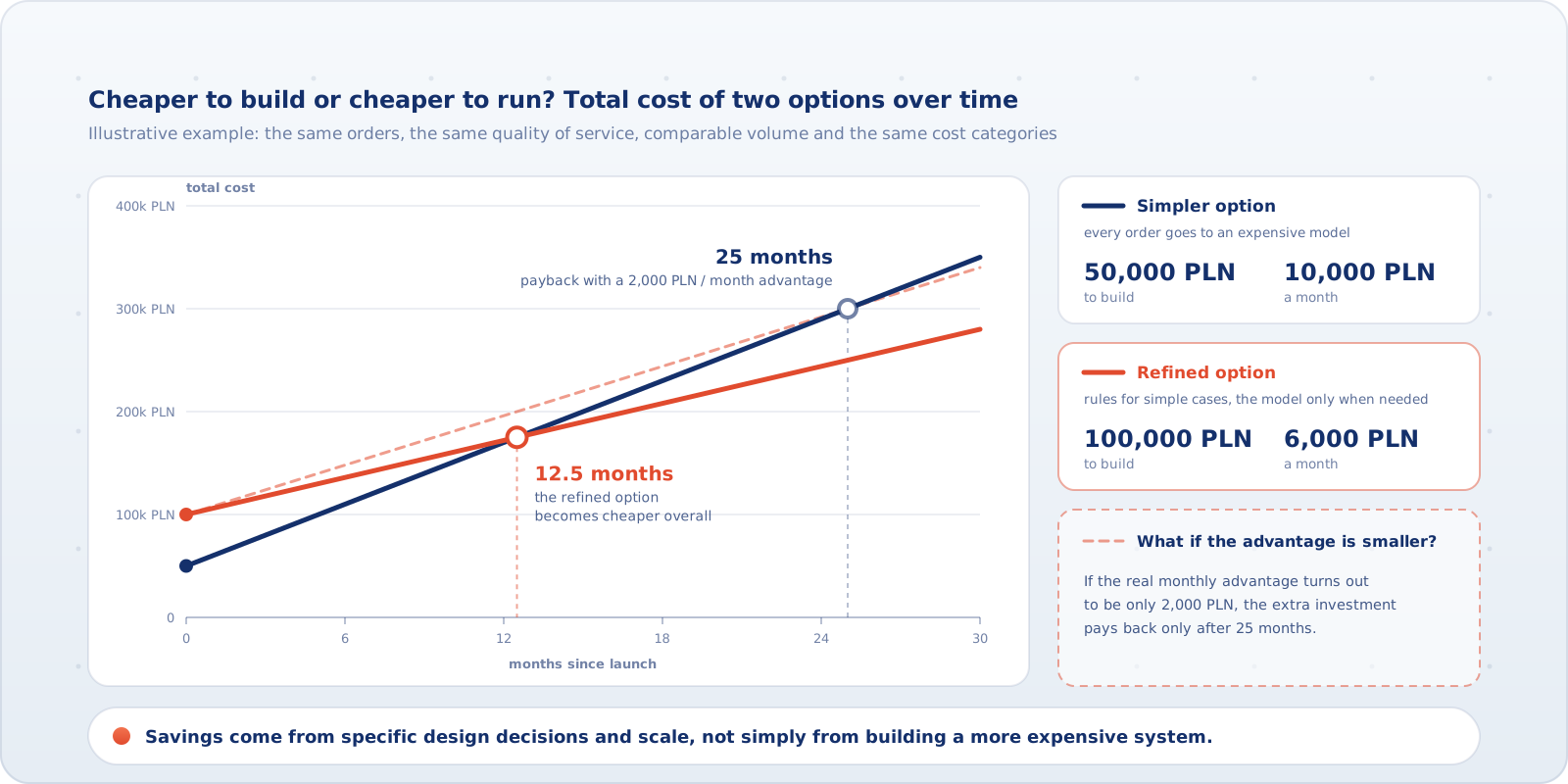
Savings come from specific design decisions and the scale of use, not simply from building a more expensive system.
How will costs change as order volume grows?
The fee for an always-on service can stay the same at 500 and at 5,000 orders, as long as its capacity holds. The cost of paid page processing grows with the number of pages, and the cost of manual handling with the number and difficulty of exceptions. Past a certain load you may need a higher plan, more infrastructure or another person. That growth comes in steps.
So a "ten times more orders" scenario doesn't automatically mean a bill ten times bigger. You also need to know document sizes, the share of unusual cases, peak hours and response time requirements. A quote based only on the average number of orders doesn't show what really triggers additional charges.
What should the estimate contain before you sign?
A CEO doesn't have to pick cloud services or calculate token prices personally. What they should expect from the team or the vendor is a breakdown that clearly answers a few questions:
- What will we pay to build it? Shown separately: the vendor's work, purchased services and your own staff's time.
- What will we pay to run it? Shown separately: fixed fees, fees that depend on the number and complexity of cases, labour costs, and expenses that appear only above a certain scale.
- Which items are really new costs? What's already covered by the company's licences and resources, and what needs extra payment? How do we avoid double counting?
- What's excluded from the proposal, and which changes will be billed separately? This matters most for integrations, data updates and adjustments after model changes.
- How will the budget change over 12 and 24 months? You need scenarios for low, expected and high volume that take different case complexity into account.
A useful measure is the cost of a correctly completed order, including a fair share of technical and labour costs. Agree whether completed cases include those finished with an employee's help. A pilot lets you measure the number of operations and the working time per case, then correct the forecast. The cost of large load peaks, which a small pilot may not reveal, needs estimating separately.
A good quote won't predict every future invoice. It should, however, show what the company pays for at the start, what it will pay for later, what will push the bill up, and which expenses haven't been estimated yet. Only then can you compare proposals for automating the same process, and not just the prices of models and application development.