A company brings in AI to read delivery date confirmations. The system recognises messages from suppliers, matches them to purchase orders and updates the dates in the ERP. In trials on the selected confirmation types, it gets things right. And yet the purchasing team still reads every email and checks every entry. The automation hasn't replaced the old task. It has added a new one on top.
The manual check could simply be dropped, but that brings a different risk. If the AI mistakes the date a confirmation was issued for the delivery date, a planner may schedule production for a day when the material won't be there yet. Technically, everything will have worked: the message was read, the date is correctly formatted, and the ERP accepted the entry.
Before moving to the new way of working, a company needs to know more than what the AI can do. It has to decide which manual task it is retiring, how it will notice quality slipping, and who takes over the work when the automation has to be scaled back.
Don't switch the whole inbox over at once
This is an illustrative example. The purchasing department receives order confirmations in a variety of formats. The AI interprets their content, and system rules check the order number, the required data and the conditions for updating the ERP. Not every message has to go straight to automatic entry.
The company can start with a defined group of suppliers and confirmation types for which reading accuracy has been checked on real message variants, including the harder ones. Cases with an ambiguous date or conflicting data go to a person. How to design that path is covered in the previous part on handling exceptions. One thing to keep in mind, though: a document that looks familiar isn't guaranteed to be interpreted correctly. A new version of a template can pass the basic checks even though the meaning of one of its fields has changed.
For the approved class of cases, staff are no longer required to open every message and retype the date. They still handle exceptions and carry out the checks the company has deliberately kept. The ERP holds the delivery date that counts. There shouldn't be a second, separately maintained record of the same date, unless it serves a distinct purpose the company really needs.
That is what switching a process over means: not just turning the AI on, but formally stating the cases for which people's daily tasks change.
What has to be proven before the old task is retired?
The process owner should see three things proven before agreeing to end the blanket manual check.
The first is that the new path is ready. The team has verified reading accuracy for the defined class of cases, including document dates mistaken for delivery dates, outdated confirmations and messages matched to the wrong order. The company has agreed which errors are unacceptable and which can be dealt with later. No single accuracy percentage suits every process.
The second is a new way of working and a warning signal. Everyone knows the date from which people stop retyping standard confirmations, who handles exceptions and where to find the current status of a case. After the switchover, a named person keeps comparing an agreed sample of automatic entries with the original messages. Planners have a simple way to report discrepancies. The trigger for action can be a detected mistake with serious consequences, or a credible report that dates in the ERP don't match the confirmations. A check like this won't catch every error straight away. Its scope and the speed of response need to match what a mistake would cost. There's more on this kind of post-launch oversight in the article on monitoring an AI system and responding to problems.
The third is a fallback plan that can actually be carried out. A named person is able to pause automatic entries for the right set of cases. The team knows how to take over new cases and check the ones already started. Before the switchover, the company also needs to compare the expected number of messages with the number its staff can realistically handle in the time required. If there aren't enough hands for everything, the plan sets priorities, a holding queue and a way of letting people know about delays.
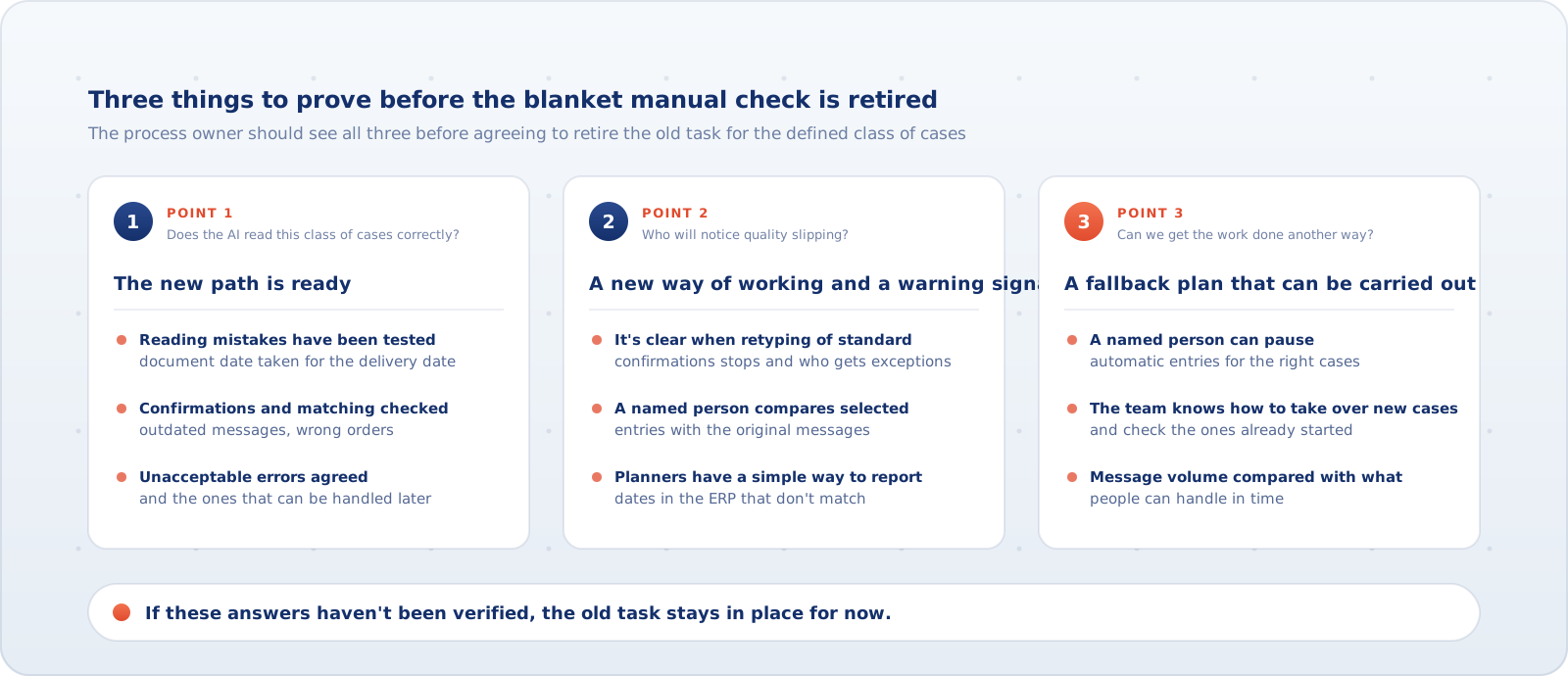
So the switchover decision is a concrete one: for which cases are we retiring manual retyping, on the basis of which trials, who will notice something wrong, and can we get the work done another way? If those answers haven't been verified, the old task stays in place for now.
The AI starts entering wrong dates. What does the company do?
Suppose a supplier changes its confirmation template. The new message contains both the document's issue date and the delivery date. The AI picks the first, although the second is the one that belongs in the ERP. The order number and the date format are still correct, so standard validation doesn't catch the mistake.
In this scenario, the person running the agreed check compares one of the entries with the source message and spots the discrepancy. That's one way it might be found, not a promise that every such mistake will land in the sample. Another signal could be a planner reporting a date that contradicts what the supplier said.
When there's a credible suspicion of wrong entries, the first move is to limit further damage. An authorised person pauses automatic updates for the suspect class of cases while the team works out how far the problem reaches. If it can't separate the safe messages from the ones at risk, the pause covers a wider scope. Only once the other classes are confirmed to be unaffected can they carry on running automatically.
What happens to new messages? There are three practical options. A person takes over the affected class and enters the dates themselves. The AI keeps preparing suggestions, but a person compares them with the original before anything is saved. Or the company temporarily holds the less urgent updates, and whoever is available concentrates on deliveries that matter for the upcoming production orders. Human review only makes sense if it can really catch this kind of mistake.
Going straight back to fully manual handling isn't always possible. If the team can only take on part of the incoming confirmations, the rest must sit in a visible queue with clear ownership. The people affected should know which dates may not be updated in time. A fallback plan has to be workable under real load, not just exist on paper.
Switching the AI off doesn't undo wrong entries
Stopping automatic entries solves the problem of new updates. It doesn't remove the effects of earlier ones. Some confirmations reached the ERP correctly. Some may not have finished processing. Others contain suspect dates.
The company has to sort these cases. The ones completed correctly aren't run again. For cases in progress, it establishes whether the entry has already been made before handing them to a person. Suspect dates are compared with the source confirmations and corrected if they're wrong. The company also checks whether deliveries or production have already been planned around them. Every case should have one valid status and one current handling path.
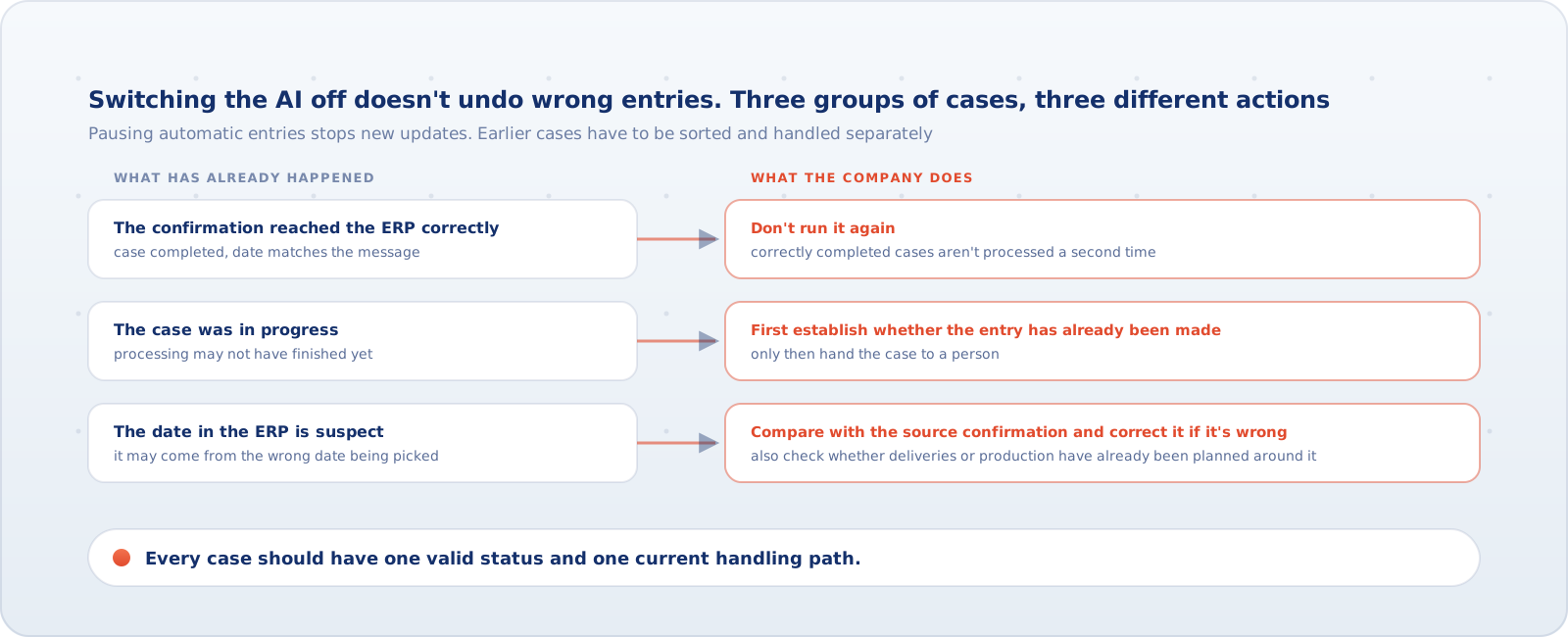
That's the difference between restoring the old way of working and repairing the effects of what has already been done. Going back to typing dates in by hand won't fix the dates the AI changed yesterday.
Automatic entries come back only after the fix has been checked on the cases that exposed the problem and the process owner has signed it off. The cases taken over manually and the corrections to old dates still need to be finished. Turning the AI back on doesn't close them automatically.
Can we really switch modes when we have to?
Before the manual procedure is formally retired, it's worth running a two-part drill in a controlled environment.
First, a signal test. The team prepares a changed template with misleading dates and tests whether the agreed comparison of the AI's output with the message, or a discrepancy report, actually triggers a response. Planting a faulty document doesn't in itself prove the company will notice it. The test confirms that specific detection routes work. It doesn't guarantee that every future mistake will be caught.
Then, a takeover test. Once the error has been reported, an authorised person pauses the entries at risk. The team shows which cases have already been written to the ERP, which are in progress and which need correcting. It routes new messages to fallback handling and checks, under a representative load, how many of them people can get through and which have to wait. It also settles who will correct the earlier wrong dates and on what basis the AI will be allowed to make entries again.
If the drill goes as intended, the check flags the wrong date and the signal reaches the purchasing manager. The suspect class is paused. Staff really do work through the agreed batch of test messages, and the rest are given priorities and owners. The team finds the entries that need checking, then carries out and verifies a sample correction. That means the response and takeover path has passed the test. It isn't proof that every real backlog has been cleared or every real correction completed. Each such case needs its own confirmation.
Let's not sign off a deployment just because the AI handles standard tasks correctly. A switchover is justified when it's clear what work people really stop doing, how the company can recognise a dangerous result, and whether it has a proven way to keep handling the work when the automation has to be scaled back.