In many companies, the automation conversation ends with one simple argument:
But we have an ERP.
And fair enough. The ERP handles orders, invoices, purchasing, the warehouse, production or finance. The data is in the system. The process has its statuses. The days of paper binders are long gone.
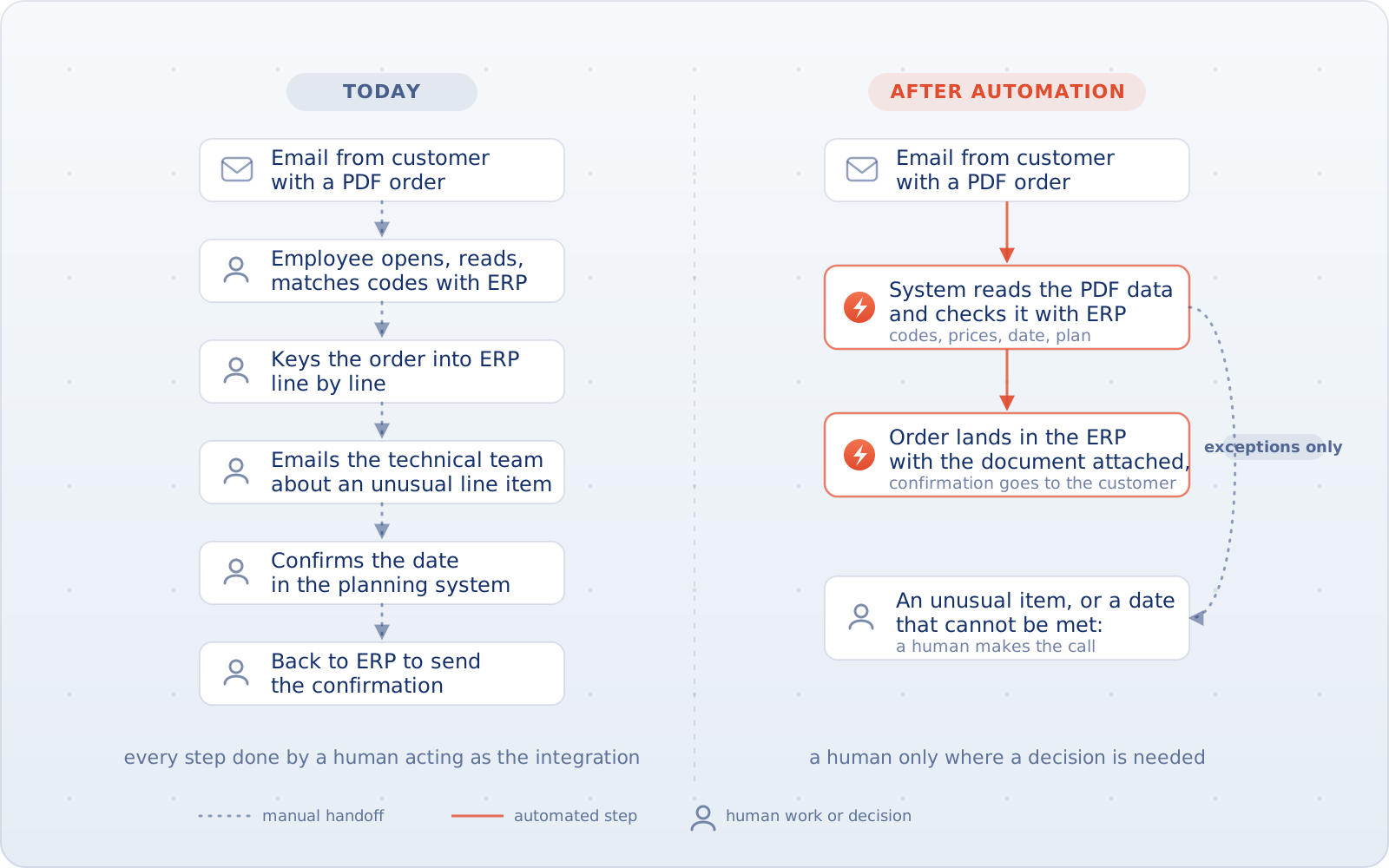
But it's worth walking through one specific process from start to finish. A customer sends an order by email, with a PDF attached. An employee opens the document, checks the product numbers, matches them against the codes in the ERP, fills in the missing details, and keys the order into the system. One line item has an unusual spec, so they have to write to the technical team. The delivery date has to be confirmed in the planning system. When all that's done, the employee goes back to the ERP and sends the customer a confirmation.
The ERP is working correctly. The order is in the system, the products are in the system, the price is in the system. The problem is that a human performed a whole string of manual steps just so the information could get there in the first place.
And that's exactly why simply having an ERP says very little about how automated a company actually is.
The ERP can be fine while the process stays manual
Of course an ERP automates part of the work. Modern systems from SAP, Dynamics, Oracle, IFS, Infor or Epicor come with workflows, integrations, approvals, data imports, document handling and a growing set of AI features. In mid-sized and large companies, an ERP is simply standard equipment by now.
But owning a system and having an automated process are two different things. An ERP is very good at what it was designed for: holding controlled data and processing business transactions. The problem starts a little earlier (how does data get into the ERP?) and a little later (what happens to it once it's saved?).
For a customer order, it can look like this:
email → PDF → human → ERP
For a supplier:
email → order confirmation → human → ERP → planning system
For shipping:
ERP → human → carrier portal → human → ERP
For reporting:
ERP → Excel → another system → Excel → report
Every one of these systems can be working correctly. The manual work hides in the seams between them, and that's exactly where to start looking for it.
The human as the integration
There's an old name for this: the swivel-chair process. An employee would literally swivel their chair between two terminals, retyping data from one system into the other. Today they switch browser tabs instead, but the mechanism hasn't changed.
The employee:
- opens an email
- reads a document
- checks the data
- copies it into a system
- exports an Excel file
- compares two lists
- asks someone for approval
- updates a status
- goes back to the first system
In practice, the employee is the integration.
That's not always a problem. If a task happens twice a month and takes five minutes, it's probably not worth touching. But if five people run similar operations every day across hundreds of orders, documents or deliveries, the picture changes.
Another good warning sign is spreadsheets that start acting as an extra operating system. Not every spreadsheet counts. Excel is an excellent tool for analysis, one-off calculations and ad hoc work. The problem looks more like this:
Every day we export data from the ERP into Excel, work out the real plan there, and then key the result back into the system.
In many companies, a spreadsheet like that has effectively replaced the ERP's production planning module: information is processed outside the system and then fed back in. The ERP is there, but the process grew up next to it.
It's a very common pattern: the ERP is the formal system of record, while the real way of working lives somewhere else.
If an ERP can do so much, where do the gaps come from?
There are usually a few reasons. The first one is very simple.
Your customer doesn't work in your ERP
A customer can send an order as a PDF, an Excel sheet, plain email text, or a form from their own system. The bigger ones will sometimes connect via EDI or an API, but not every customer is willing to adapt their process to your ERP. The same goes for suppliers: one uses a portal, another sends PDFs, a third confirms dates in the body of an email.
The ERP may well know what to do with an order confirmation once the right data reaches it. But someone, or something, has to read and understand it first.
The ERP isn't the only system in the company
In manufacturing, an ERP usually runs alongside several other systems: an MES on the shop floor, a WMS in the warehouse, a TMS in logistics, a quality system, a CRM, product design tools, separate planning and finance systems, plus supplier and customer portals.
And that's normal. Not every problem should be solved inside the ERP. A product design tool has a different job than a finance system, and logistics has a different job than production. The problem appears when the information between them is carried by people.
The company changes faster than the system
A new plant comes online. The company acquires another business. A big customer arrives with their own way of placing orders. A local process appears that nobody anticipated when the ERP was implemented five years ago. After a while, the landscape looks nothing like it did on go-live day.
It doesn't always make sense to immediately fold everything into one ERP instance. Sometimes two systems can run side by side for years. Then the problem isn't that they exist, but how the data flows between them.
The feature exists, but nobody ever rolled it out
An employee sends every approval by email. The first thought:
We need to automate the approval workflow.
Except the ERP may already have exactly that workflow. Maybe it was never configured, maybe it needs an extra license, maybe years of custom modifications get in the way. Or people worked out their own way of doing things long ago and nobody remembers why it's done like that anymore.
Which is why a manual step, on its own, is not yet proof that you need to build a new system. First you have to understand why that step is manual.
Before you build anything, check whether you already own the solution
When you find a manual process around the ERP, the wrong first question is:
What could we build here?
The better one is:
Can the system we already have do this?
It's less exciting, but it very often leads to a better answer. SAP has mechanisms for automated order import, workflows and integrations. Dynamics has, among other things, Invoice Capture, purchasing workflows and exception handling. Oracle has approvals, APIs and document processing. IFS, Infor and Epicor ship their own workflow, integration and automation tooling too.
If the right feature is already paid for, supported by the vendor, and solves the problem well enough, that's usually the place to start. There's no point building your own invoice approval system just because nobody ever configured the module the company already owns. Likewise, there's no sense building an AI layer to move seven fields between two systems that both have decent APIs. Sometimes the simplest integration is the best automation.
And sometimes the analysis shows you don't need to do anything at all. That's a valid result too.
Pick the simplest fix that removes the manual step
Think of it as five options in order. Don't start with the last one.
1. A feature in the ERP
If the process is standard and the ERP can already handle it, the simplest thing is to just use the ERP.
Example: a manager approves purchases by email even though the system has an approval workflow. That's probably not a problem calling for AI or custom development. It's a configuration problem, or a way-of-working problem.
2. An integration
If one system holds correct data that another system needs, you just have to move it: via an API, EDI, or an off-the-shelf connector.
Example: an employee copies shipping data from the ERP into the TMS and then retypes the tracking number back. If both systems have decent interfaces, that's first and foremost an integration problem.
3. Document automation or a workflow
Things change when the data doesn't arrive in neat fields. A customer sends a PDF, a supplier replies by email. The document has to be classified, the data checked, and any missing information routed to the right person. Here you need more than a straight connection between two APIs.
Example:
A customer sends an order as a PDF. The system reads the order number, products, quantities and date. It then compares them with the ERP data. Standard line items go through. An unknown product code goes to an employee.
Now that's process automation.
4. A dedicated automation layer
Then there are processes specific to one company. They cross several systems, follow their own rules, happen frequently and consume a lot of work, and off-the-shelf tools can't handle them without piling up workarounds. That's when a custom automation layer can make sense.
But the reason should sound like this:
We have a valuable, stable, company-specific process that our existing systems can't handle well.
Not:
We could code that.
The fact that something can be built doesn't yet mean it's worth building.
5. Replacing or modernizing the ERP
At the very end sits the ERP itself. There are situations where it genuinely is the problem: the system is unsupported, extremely hard to integrate, heavily customized, blocking upgrades, or built on a data model that no longer fits the company. At that point, adding more bots, spreadsheets and integrations only postpones the reckoning.
But a few manual steps around the ERP are not yet an argument for replacing it.
So a sensible order for analyzing any process looks like this:
ERP → integration → workflow or documents → dedicated automation → ERP modernization
Move to the next level only once you can say why the previous one isn't enough.
And where does AI fit into all this?
Sometimes it doesn't. If field A from one system goes into field B in another, the customer sends data through an agreed API, and product codes map one-to-one, then what you have is rules and integrations. AI improves nothing here.
It gets interesting when information has to be interpreted: orders arriving as PDFs in every imaginable format, product descriptions written in the customer's own words, email bodies, unusual RFQs, quality documents. That's where a model can help turn unstructured information into data your existing systems understand.
But even then, the wrong first question is:
Which model should we use?
Process first. Then the simplest technology that makes sense.
Don't try to automate the exceptions at any cost
Say a supplier sends an order confirmation. In most cases everything matches: product, quantity, price and date. Today, an employee may be opening every single confirmation to check those four things. That's a good automation candidate.
The problem shows up at the exception. The supplier moved the date by three weeks. Now what? The system can detect the difference, check which production orders are affected, and lay out all the relevant data. But someone may still need to decide whether to accept the delay, change the production plan, look for another supplier, or notify the customer.
And there's nothing wrong with that. The goal of automation shouldn't always be:
no human ever touches the process.
A better goal is often:
humans don't handle the standard cases, and only get the ones that genuinely need a decision.
That's how the ERP vendors design it too. Dynamics has separate handling for invoices the system couldn't process correctly. IFS, when reading RFQs automatically, lets the user review and correct the result before a quote is created.
That's not unfinished automation. That's a sensible division of labor: the system does what's repetitive, and humans stay where the cost of an error or the uncertainty is too high.
How to check whether a process is really automated
Don't count systems or modules. Take one specific process instead, for example:
from the moment the customer sends an order to the moment they receive a confirmed date.
And walk through it step by step, marking every moment where a human:
- opens an email
- reads a PDF
- copies data
- exports a file
- keys information into a second system
- compares two sources
- asks someone for approval
- fixes an error
- restarts the process
That tells you far more than asking:
Do we have order automation?
You can also measure:
- what share of cases go through without manual intervention
- how many times a single case gets handed off manually
- how long the whole process takes
- how much of that time is actual human work
- what share of cases end up as exceptions
- how many cases need corrections
For ROI, the distinction between elapsed process time and actual human work matters most. An invoice can take the better part of a day to travel from the inbox to the ledger, but nobody spends that time typing it in: for most of it, the document is simply waiting in inboxes, queues and approval loops.
Which is why, when automating, it's not enough to say:
We'll cut the process from 12 hours to 2.
You have to know how much real work was in there, where the process was waiting, and what exactly the automation will change.
By the same token, don't assume that every manual process deserves automation. If something happens very rarely, keeps changing, has no clear rules, runs on bad data, or a single error could be very costly, it may not be a good candidate yet. It needs to be understood first. That's exactly the same problem that comes up when assessing whether a process is ready for automation.
The right question to start with
The ERP can be doing exactly what it should. It doesn't have to be old, badly implemented, or due for replacement. And the company can still have piles of manual work all around it.
So instead of starting with:
What else should we roll out in the ERP?
or:
Where could we use AI?
start with a simpler question:
Where in this process does the information stop flowing on its own?
Where someone opens an email. Where they read a document. Where they retype data. Where they compare two systems. Where they export an Excel file only to key the result back in an hour later.
Only then can you decide what's actually needed. Sometimes it will be an ERP feature, sometimes an integration, sometimes document automation, sometimes a custom system. And sometimes it will turn out the process isn't worth automating at all yet.
The ERP doesn't tell you whether a process is automated. It only shows you one of the systems that process passes through.